How to Use Naver Map in Korea (and Why Google Maps Isn't Enough)
Quick answer
- Use Naver Map in Korea. It has English maps, English navigation, and transit, walking and driving directions.
- Google Maps showed transit routes in Seoul in our web test on Oct 22, 2026, but no walking or driving directions for the route we checked.
- Install Naver Map before you fly. It follows your phone's language, or you can pick English in the app's language setting.
- South Korea's government conditionally approved Google's request to export 1:5,000-scale map data, subject to security requirements. In our web test on Oct 22, 2026, walking and driving directions were still unavailable for the route we checked.
The short version
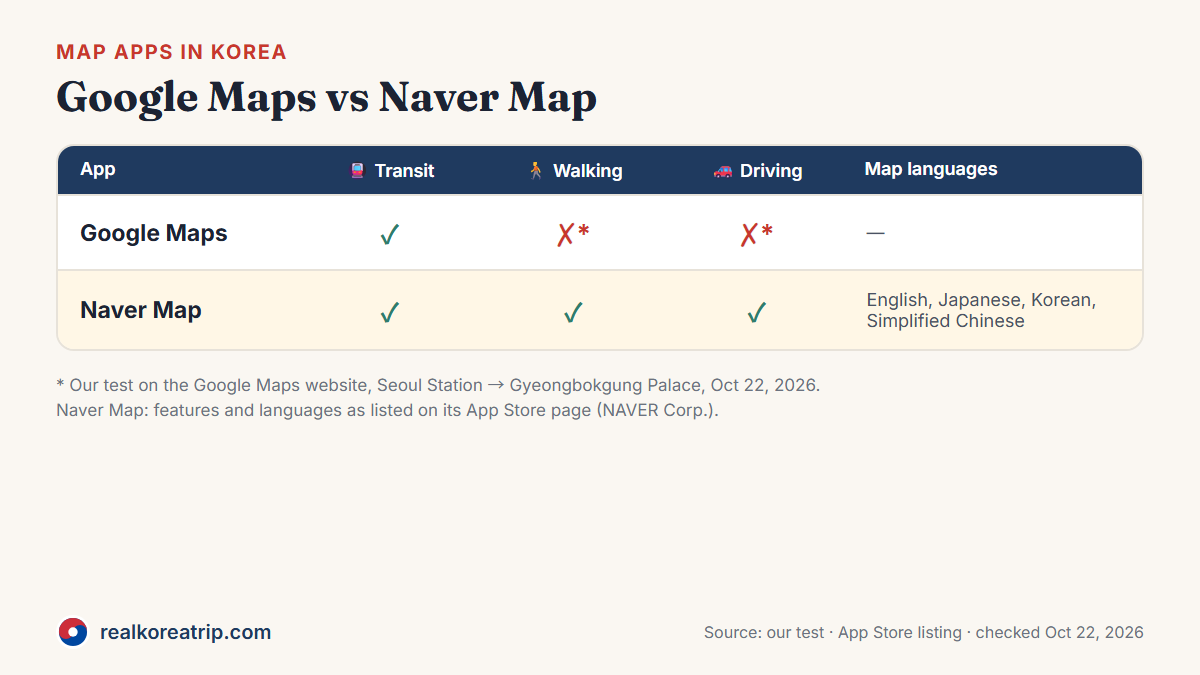
| Google Maps | Naver Map | |
|---|---|---|
| Transit directions | ✅ Worked in our test | ✅ With real-time departure and arrival times |
| Walking directions | ❌ Not available in our test | ✅ |
| Driving directions | ❌ Not available in our test | ✅ English navigation |
| Map languages | — | English, Japanese, Korean, Simplified Chinese |
Source: our Google Maps test on Oct 22, 2026; Naver Map App Store listing, checked Oct 22, 2026.
Why Google Maps isn't enough in Korea
On Oct 22, 2026, we asked Google Maps (on the web, in English) for directions from Seoul Station to Gyeongbokgung Palace:
- Transit: route options were shown; travel times varied by departure time.
- Walking: "Sorry, your search appears to be outside our current coverage area for walking."
- Driving: the same message, "…outside our current coverage area for driving."
- Cycling: the cycling option was unavailable in that web test.
That's one route on one day, on the web version, and it may change. On February 27, 2026, South Korea's government conditionally approved Google's request to export 1:5,000-scale map data, subject to security requirements. That decision doesn't by itself tell you when new features arrive — in our web test almost eight months later, walking and driving directions were still unavailable for the route we checked.
Source: our own test, Oct 22, 2026; Korea Policy Briefing — Ministry of Land, Infrastructure and Transport (Korean), Feb 27, 2026.
What Naver Map gives you
Naver Map is made by NAVER Corp. According to its App Store listing and NAVER's own announcements:
- Maps in four languages — English, Japanese, Korean and Simplified Chinese — and English navigation.
- Transit directions for different kinds of transport, with real-time departure and arrival times.
- Walking directions and car navigation with real-time traffic.
- Translated place information: NAVER says it has extended English, Chinese and Japanese translation to visitor reviews and place filters, and improved translations of place pages and transit details.
Source: Naver Map App Store listing; NAVER press releases of Oct 2, 2024 (Korean) and Dec 30, 2024; checked Oct 22, 2026.
How to use Naver Map, step by step
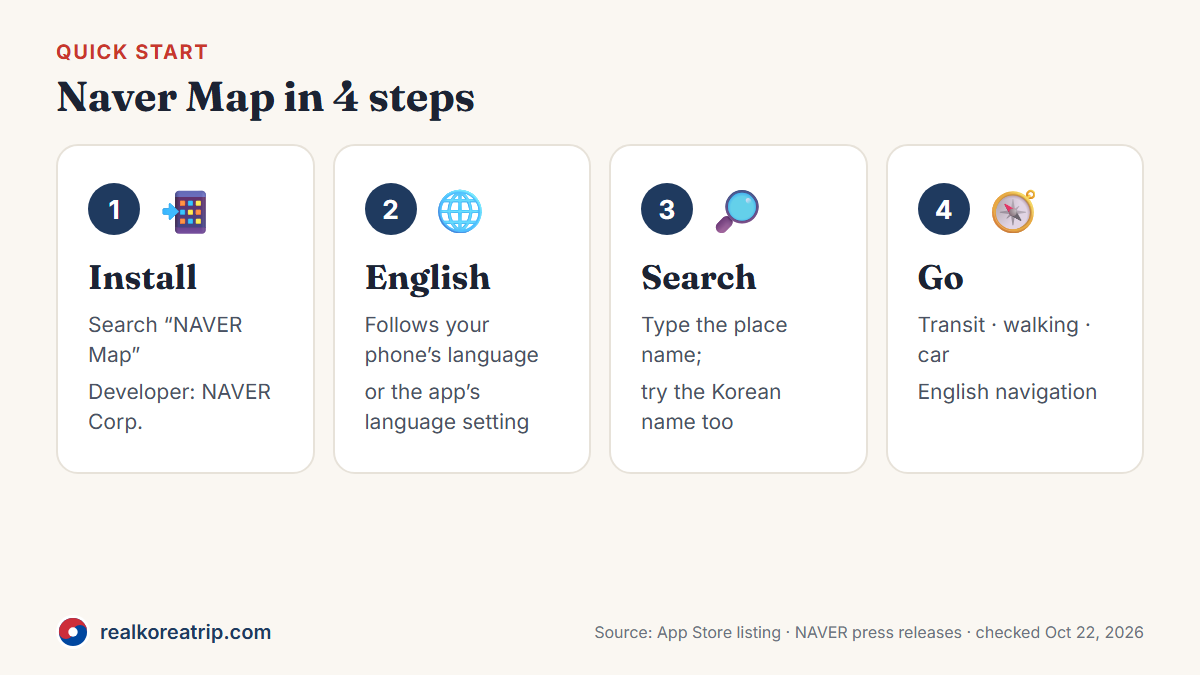
1. Install the right app
Search your app store for "NAVER Map" and check that the developer is NAVER Corp. (the App Store lists it as "NAVER Maps, Navigation"). Install it before you fly.
2. Get it in English
NAVER says the multilingual version follows your phone's language setting, or the language setting inside the Naver Map app. If your phone is set to English, the map should appear in English; if not, look for the language option in the app's settings and choose English.
3. Search for a place
Type the place you want to go. Place pages, visitor reviews and filters can appear in English, according to NAVER's announcements.
4. Get directions
Choose your destination and pick how you're traveling:
- Transit — shows routes with real-time departure and arrival times
- Walking — walking directions
- Car — navigation with real-time traffic, with English navigation available
5. Save the places you'll need
To save places, sign in with a NAVER account. Search for your hotel or another place, then use the star/save button. If you prefer not to sign in, keep your hotel's name and address in a note and search for it when you need it.
Source: Naver Map App Store listing; NAVER press release of Oct 2, 2024 and NAVER Map Help — saving places (Korean); checked Oct 22, 2026.
Before you fly: checklist
- Install Naver Map and set it to English.
- Sign in to save your hotel and first few stops — or keep their names and addresses in a note.
- Plan how you'll get online in Korea (eSIM, SIM card or Wi-Fi) so the app can load routes.
- Read up on getting around: Incheon Airport to Seoul and how to get a T-money card.
FAQ
Does Google Maps work in South Korea?
Partly. In our test on Oct 22, 2026, it gave transit directions in Seoul but no walking or driving directions.
Is Naver Map available in English?
Yes. Its App Store listing lists English, Japanese, Korean and Simplified Chinese maps, plus English navigation.
How do I switch Naver Map to English?
NAVER says the app follows your phone's language setting, or you can choose a language in the Naver Map app's own language setting.
Did Korea allow Google Maps to work fully in 2026?
On February 27, 2026, the government conditionally approved Google's request to export 1:5,000-scale map data, subject to security requirements. In our web test on Oct 22, 2026, walking and driving directions were still unavailable for the route we checked.
- Our own test of Google Maps (web), Seoul Station to Gyeongbokgung Palace, Oct 22, 2026
- NAVER Maps, Navigation — App Store listing (NAVER Corp.)
- NAVER press release — Naver Map translates place reviews into English, Chinese and Japanese (Oct 2, 2024, Korean)
- NAVER press release — Naver Map usage guide for foreign visitors (Dec 30, 2024)
- NAVER press release — multilingual maps and English navigation (Jan 24, 2018, Korean)
- Korea Policy Briefing (Ministry of Land, Infrastructure and Transport) — Google 1:5,000 map export conditionally approved (Feb 27, 2026, Korean)
- NAVER Map Help — How to save places (Korean)
Last checked Oct 22, 2026. Details can change — please confirm with the official source before you travel.