10 Apps for Traveling in Korea: What Each One Does
Quick answer
- Install Naver Map and Papago before you fly. Naver Map gives transit, walking and driving directions with English maps; Papago, also by NAVER Corp., translates text, photos and speech across 14 languages (offline only for some languages, after you download a pack).
- For transport: KORAIL+ sells KTX tickets. For taxis, k.ride and TABA take overseas cards registered in the app, and Uber works with your existing account.
- For entry and safety: apply for a K-ETA only on k-eta.go.kr or the official K-ETA app, and add the government's Emergency Ready and Baro Emergency Reporting apps.
The two apps to install before you fly are Naver Map, for transit, walking and driving directions with English maps, and Papago, NAVER's translator for 14 languages that also reads text from photos. Add KORAIL+ for KTX tickets, a taxi app that takes overseas cards (k.ride, Uber or TABA), the official K-ETA app if you need one, and the government's two safety apps. Below: what each app does, according to its official listing or operator.
Source: Naver Map and Papago App Store listings and Korail; checked Oct 25, 2026.
The short version
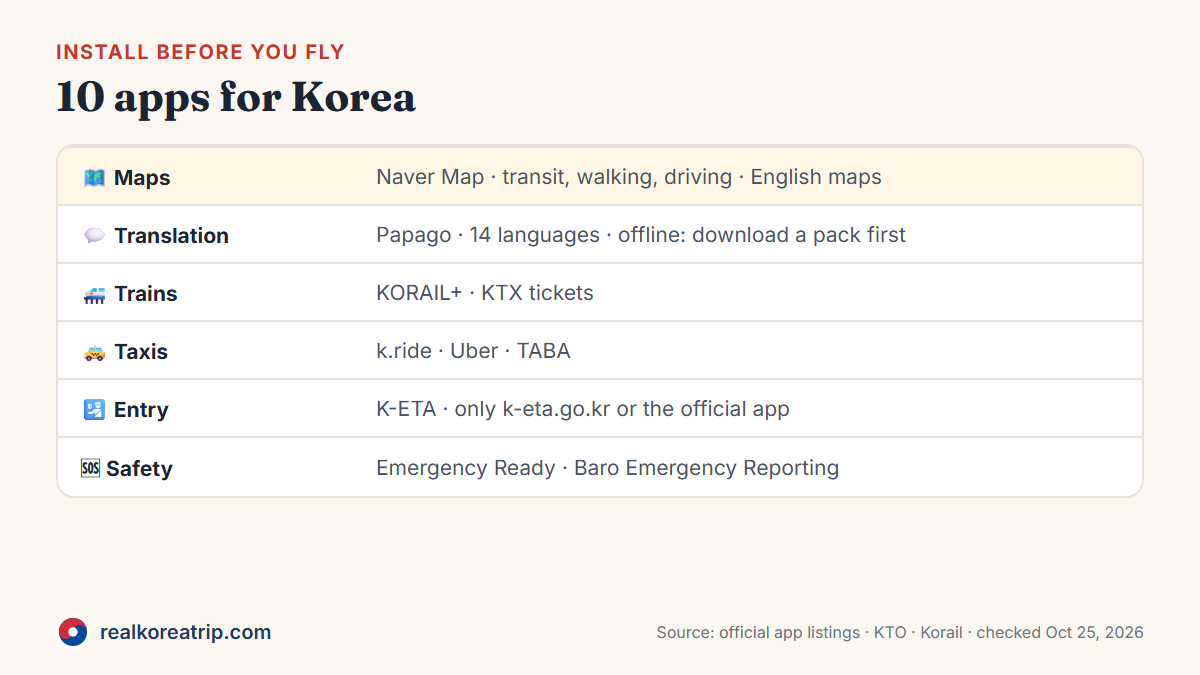
| Need | App | What it does |
|---|---|---|
| Maps and directions | Naver Map | Transit with real-time departure and arrival times, walking and driving directions; maps in English |
| Translation | Papago | Text, photo, voice and conversation translation across 14 languages; offline for selected languages after you download a pack |
| Trains | KORAIL+ | Buy KTX tickets; bookings normally open at 07:00 two months ahead |
| Entry | K-ETA | The official K-ETA application, alongside k-eta.go.kr |
| Taxis | k.ride | Kakao Mobility's app for visitors, in English, Chinese and Japanese |
| Taxis | Uber | Calls an Uber Taxi with your existing account; translates messages to the driver |
| Taxis | TABA | Taxi app that takes Visa, Mastercard, UnionPay and JCB |
| Paying | WOWPASS | Prepaid card for visitors: money exchange, payment and transport |
| Safety | Emergency Ready | Disaster information in 22 languages, with alerts for your region |
| Safety | Baro Emergency Reporting | Report an emergency by text or image |
Source: each app's official listing or operator page (linked below); checked Oct 22–25, 2026.
Getting around
Naver Map
Made by NAVER Corp., Naver Map gives transit directions with real-time departure and arrival times, walking directions and car navigation, with maps in Korean, English, Japanese and Chinese. In our own web test on Oct 22, 2026, Google Maps showed transit routes in Seoul but no walking or driving directions for the route we checked.
Source: Naver Map App Store listing; checked Oct 22, 2026. Full guide: how to use Naver Map.
KORAIL+
Korail sells KTX tickets on its website, in the KORAIL+ app, at ticket machines and at train stations, but not at subway stations. Tickets normally go on sale at 07:00, two months before your travel date.
Source: Korail — ticketing guide; checked Oct 25, 2026. Full guide: how to book the KTX.
Taxi apps: k.ride, Uber and TABA
| App | What the official pages say |
|---|---|
| k.ride | Kakao Mobility's version of Kakao T for visitors: English, Chinese and Japanese; sign in with Google or Apple; register an overseas credit card |
| Uber | Use the Uber app you already have to call an Uber Taxi; messages to the driver are translated automatically |
| TABA | Visa, Mastercard, UnionPay and JCB; covers Seoul and nearby areas, Incheon, Jeju, Chuncheon, Wonju, Daejeon, Gumi, Gwangju, Gimhae and Changwon |
Source: Korea Tourism Organization — Taxi and TABA; checked Oct 25, 2026. Fares and tips: taxis in Korea.
Language
Papago
Papago is NAVER Corp.'s translator. Its official listing names 14 languages, including English, Japanese, Chinese (Simplified and Traditional), Spanish, French, Vietnamese, Thai, Indonesian, Russian, German, Italian and Arabic.
| Feature | What it does |
|---|---|
| Image translation | Take a photo, and Papago translates the text in it (menus, signs) |
| Voice translation | Speak, and get the translation in real time |
| Conversation | A 1:1 conversation where each person speaks their own language |
| Offline | On supported devices, after you download an offline language pack while online: Korean, English, Japanese and Simplified Chinese only |
Offline text translation is available on supported devices after you download an offline language pack while online. It supports Korean, English, Japanese and Simplified Chinese; NAVER's help page lists 4 GB of RAM or more for the device. Image, conversation, website and document translation don't work offline. Papago also works in a browser at papago.naver.com.
Source: Papago App Store listing and Papago help — offline translation (Korean); checked Oct 25, 2026.
Entry and paying
K-ETA
If you need a K-ETA, apply only on k-eta.go.kr or the official K-ETA app; the government warns about lookalike sites that charge extra. 22 countries and regions are temporarily exempt until December 31, 2026 (Korea time).
Source: K-ETA; checked Oct 23, 2026. Full guide: K-ETA explained.
WOWPASS
Its operator, Orange Square, Inc., describes WOWPASS as "an all-in-one prepaid card for foreign travelers in Korea, covering money exchange, payment, transportation, and brand rewards." Check fees and limits in the app before you load money.
Source: WOWPASS App Store listing; checked Oct 23, 2026. More on cards and cash: paying in Korea.
Safety
| App | Run by | What it does |
|---|---|---|
| Emergency Ready | Ministry of the Interior and Safety | Disaster information in 22 languages, including English, Chinese and Japanese; choose your region and disaster-alert settings |
| Baro Emergency Reporting | Ministry of the Interior and Safety | Report an emergency by text or image; in English, Chinese, Japanese, Vietnamese, Filipino and more |
Source: Seoul Metropolitan Government — Emergency Ready App and Korea Tourism Organization — disaster safety services; checked Oct 25, 2026. Numbers to save: emergency help in Korea.
Before you fly
- Install Naver Map and Papago, and download Papago's offline pack if your language pair is supported.
- Install KORAIL+ if you'll take the KTX.
- Set up one taxi app with your card (k.ride, Uber or TABA).
- Need a K-ETA? Use only k-eta.go.kr or the official K-ETA app.
- Add Emergency Ready and Baro Emergency Reporting.
Source: the official listings and operator pages linked above; checked Oct 22–25, 2026.
FAQ
What is the best map app for Korea?
We recommend Naver Map. It gives transit, walking and driving directions with English maps. In our Oct 22, 2026 web test, Google Maps showed no walking or driving directions for the Seoul route we checked.
Which translation app works in Korea?
Papago, by NAVER Corp. It translates text, photos and speech across 14 languages. Offline translation works for Korean, English, Japanese and Simplified Chinese on supported devices, after you download a language pack.
Can I call a taxi in Korea with an English app?
Yes. k.ride works in English, Chinese and Japanese and takes overseas cards; TABA lets you search addresses in any language and takes Visa, Mastercard, UnionPay and JCB; and Uber calls an Uber Taxi with your existing account and translates messages to the driver.
Is there an official K-ETA app?
Yes. The government says to apply only on k-eta.go.kr or the official K-ETA app.
- Naver Papago — App Store listing
- Papago help — Offline translation (Korean)
- Naver Map — App Store listing
- Korail — Ticketing guide
- K-ETA — Application guide
- Korea Tourism Organization — Taxi
- TABA taxi app
- WOWPASS — App Store listing
- Seoul Metropolitan Government — Emergency Ready App
- Korea Tourism Organization — Disaster safety services
Last checked Oct 25, 2026. Details can change — please confirm with the official source before you travel.
We publish new guides regularly and update old ones when fares, rules or hours change. Follow our free RSS feed in any feed reader (such as Feedly or Inoreader), or check the latest guides on our homepage.